
A CREATION & EDITING TEST
A place for your things.
Made your way.
We asked Etono to make a personal inventory, then asked for a simpler way to find things lent out. Here are the requests, actual results and checks from that test.
01 · DESCRIBE
Start with what
you need to remember.
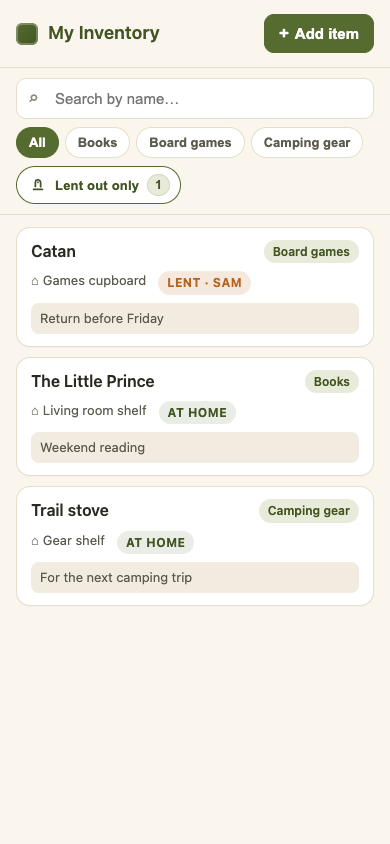
We chose three categories and a few useful details: where an item is, whether it is lent out, and who has it. A focused first request makes the result easier to check.
This is the original request used in the test. You can change the categories and interface language for your own version.
Build a personal inventory app for my books, board games and camping gear. Let me add, edit and delete an item with its name, category, storage location and a note. Add search by name and a category filter. Each item can be at home or lent out, with an optional borrower name. Keep my entries after I close and reopen the app. Use an English interface that is comfortable on a phone, with a warm white background and dark olive accents. Start empty. Please build it and test the main actions.
02 · TRY THE RESULT
Add a few things.
Try the everyday actions.
The first result included item details, name search, category filters and loan status. We added a book, a board game lent to Sam, and a camping stove to exercise the flow.
What we checked
- Add, edit and delete an item
- Search by name and filter by category
- Record a borrower and mark an item as returned
- Keep saved records after restarting
03 · ASK FOR A CHANGE
“Show only what
I have lent out.”
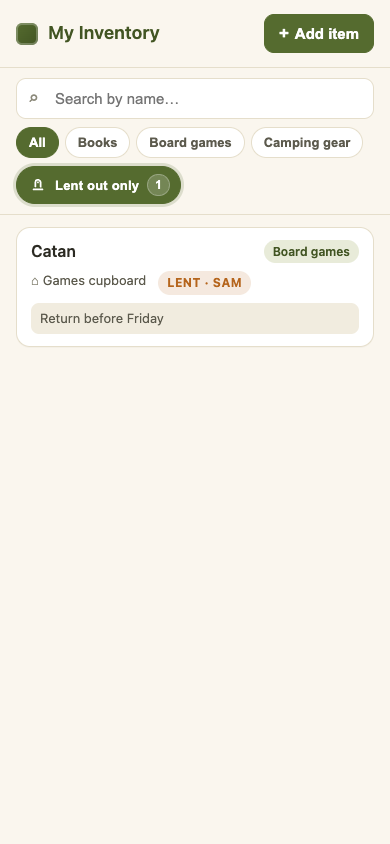
The initial version already had status tabs. Our follow-up produced a dedicated “Lent out only” switch with a count. We checked that it worked with search and category filters, and kept the existing records.
Add a filter that shows only the things I have lent out. Keep the existing search and category filters working together with it, and preserve all saved items. Test the change.
04 · CHECK & REPAIR
Try the controls.
Check more than the output.
Our browser check found that the add-item and detail panels covered the list on first opening. In a third request, we asked Etono to fix opening and closing the panels while preserving existing records.
After the repair
- The list is visible on opening, with both panels closed
- Item details open on a tap and close back to the list
- A newly saved item remains after reopening
- The loan filter combines with category and name search
The screenshots show the final checked version.
SCOPE & LIMITS
Use the example.
Check your own result.
This was a controlled creation and editing test with the Etono version in service at the time. We checked the generated app in a browser at phone-sized widths and tested saved data across restarts. This case does not establish behavior on an iPhone or Android device.
Generated results can differ and may need further changes. This is a personal inventory, not a shared team system or a ready-made template. Keep separate backups of important information. Etono is currently in limited testing.