
BEGINNER GUIDE · AI APP BUILDER
Create your own app.
Without coding.
Start with one personal task, describe the app you need, and test what AI creates. This guide takes you from a first request to a follow-up change in Etono, all on your phone.
You do not need coding experience to get started. You do need to check the result: an app that looks finished can still have a button, calculation or saved record that needs fixing.
01 · PREPARE
Install Etono.
Check your Credits.
Choose the download option for your device, install Etono, and sign in. Android has a website APK; iPhone and iPad use TestFlight. Store testing eligibility and available beta places can differ.
AI creation and editing need an internet connection and use Credits. Check your account balance and the current prices before starting. Keep Etono in the foreground during creation.
What you will make
A small inventory app for your own belongings: add an item, find it, and record whether you lent it out. The same process works as a starting approach for other personal tools.
The worked example comes from our October 17, 2026 creation test. That test checked the generated app in a browser at phone-sized widths and checked saved data across restarts. It was not an iPhone or Android device test. Your generated result can differ.
02 · CHOOSE ONE TASK
Describe the actions,
not just the app name.
“Make an inventory app” leaves many choices open. Decide what information to save, what you want to do with it, and what should remain after reopening.
For a first project, keep the scope small. Add a feature only after the main actions work. A shared team system, for example, needs accounts and synchronization beyond this personal example.
Write a short brief
- Purpose: find my books, board games and camping gear.
- Information: name, category, storage location and a note.
- Actions: add, edit, delete, search and filter.
- State: at home or lent out, with an optional borrower.
- Saving: keep entries after closing and reopening.
03 · CREATE
Start a project.
Send a clear request.
Open a new project in Etono and paste the request. Change the categories and language to fit your needs. Wait for creation to finish, then open the app in Etono.
This is the original English request from our inventory test. The design details are optional; keep the actions and saving requirements clear.
If creation stops or the app does not open, read the message shown in Etono and continue in the same project. Describe the visible problem before asking for more features.
Build a personal inventory app for my books, board games and camping gear. Let me add, edit and delete an item with its name, category, storage location and a note. Add search by name and a category filter. Each item can be at home or lent out, with an optional borrower name. Keep my entries after I close and reopen the app. Use an English interface that is comfortable on a phone, with a warm white background and dark olive accents. Start empty. Please build it and test the main actions.
04 · TEST
Try the controls.
Reopen your records.
Use a few made-up entries before adding anything important. Create three items, with different categories and one marked as lent out.
- Add an item and open its details. Check that the values match.
- Change its storage location, then search by name and filter by category.
- Record a borrower, then mark the item as returned.
- Close and reopen the app. Check that the entries and edits remain.
- Delete a test entry and confirm only the intended entry disappears.
If a step fails, say what you tapped, what happened, and what you expected. Ask for a focused repair and repeat the failed check. A completion message alone does not verify the app.
05 · REFINE
Ask for one change.
Keep the existing data.
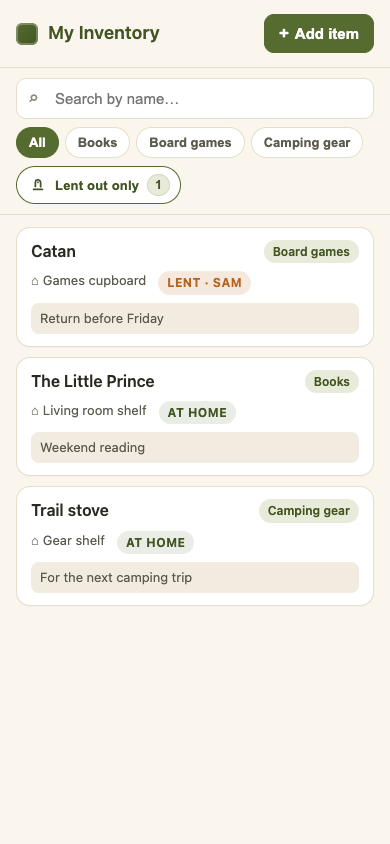
Continue in the same project's conversation. Name the change and the behavior you want to preserve. In our test, the follow-up added a dedicated “Lent out only” switch with a count.
After the change, combine the new filter with name search and a category filter. Reopen the app and check that existing items remain. If an old action breaks, repair it before adding another feature.
See the tested change ↗Add a filter that shows only the things I have lent out. Keep the existing search and category filters working together with it, and preserve all saved items. Test the change.
BEFORE EVERYDAY USE
Keep the scope
and your data in mind.
This walkthrough creates a personal app you use inside Etono. It does not cover exporting a standalone APK or publishing an app to a store.
There is no complete project cloud sync. Deleting Etono or clearing its app data may remove local projects; keep separate backups of important information. On iOS, apps pause when you leave Etono. Android background activity is subject to system and battery limits.
For another starting request, explore building a packing-list app with your own rules. Treat untested additions as new work to check, even when the first version runs.